Settings - Commitments - Commitment Settings - Default Work Retainage
 Updated
Suggested Prior Reading
Default Work Retainage
This option sets the Default Work Retainage for all Purchase Orders and all Subcontracts when a new Purchase Order or Subcontract is created.
This is a system level option as it applies to all new Purchase Orders or Subcontracts on all Projects (unless over-ridden by Default Work Retainage at the Project level).
It is a default only and can be changed.
Ways the Purchase Order Default Work Retainage % is set
This Default Work Retainage percent for a Purchase Order can be populated multiple ways:
- It can be set at the System level (which is this setting)
- It can be set at the Project level (see Commitments List - Settings)
- It can be set at the Purchase Order level (see Purchase Order - General - General Information - Default Work Retainage).
Note* Regardless of where it is set, the Work Retainage % applies to both Purchase Orders and Subcontracts.
Populating the Purchase Order Default Work Retainage %
- When a new Project is created, the Project level Default Work Retainage % for all Purchase Orders and Subcontracts is set to the System level Default Work Retainage % (this setting).
- This Project level Default Work Retainage % can be changed by a User with Admin permissions on the Project.
- When a new Purchase Order is created, the Purchase Order level Default Work Retainage % is set to the Project level Default Work Retainage %.
- This Purchase Order level Default Work Retainage % can be changed by any User with Add, Edit or Admin permissions on Commitments for this Project.
- When an Invoice Line Item is created, the Invoice Line Item level Work Retainage % is set to the Purchase Order level Default Work Retainage %.
- The Invoice Line Item Work Retainage % (or Value) can be changed by an User with Add, Edit or Admin permissions on Invoices for Commitments for this Project.
Changing the Default Work Retainage at the System level
Changing the Default Work Retainage here, does not impact existing Invoices or Purchase Orders or Subcontracts and the defaults set there, nor does it impact the Default Work Retainage set at the project level. It only impacts new Projects going forward as the Default Work Retainage for any Commitments on the Project will be set to these settings.
To Enter or Change the Default Work Retainage at the System level
- Navigate to Settings for Commitments, see Settings - Commitments.
- Locate the Default Work Retainage option in the Commitment Settings section.
- Enter or change the Default Work Retainage %.
This is a percentage so for 10%, enter 10. Decimals can be entered.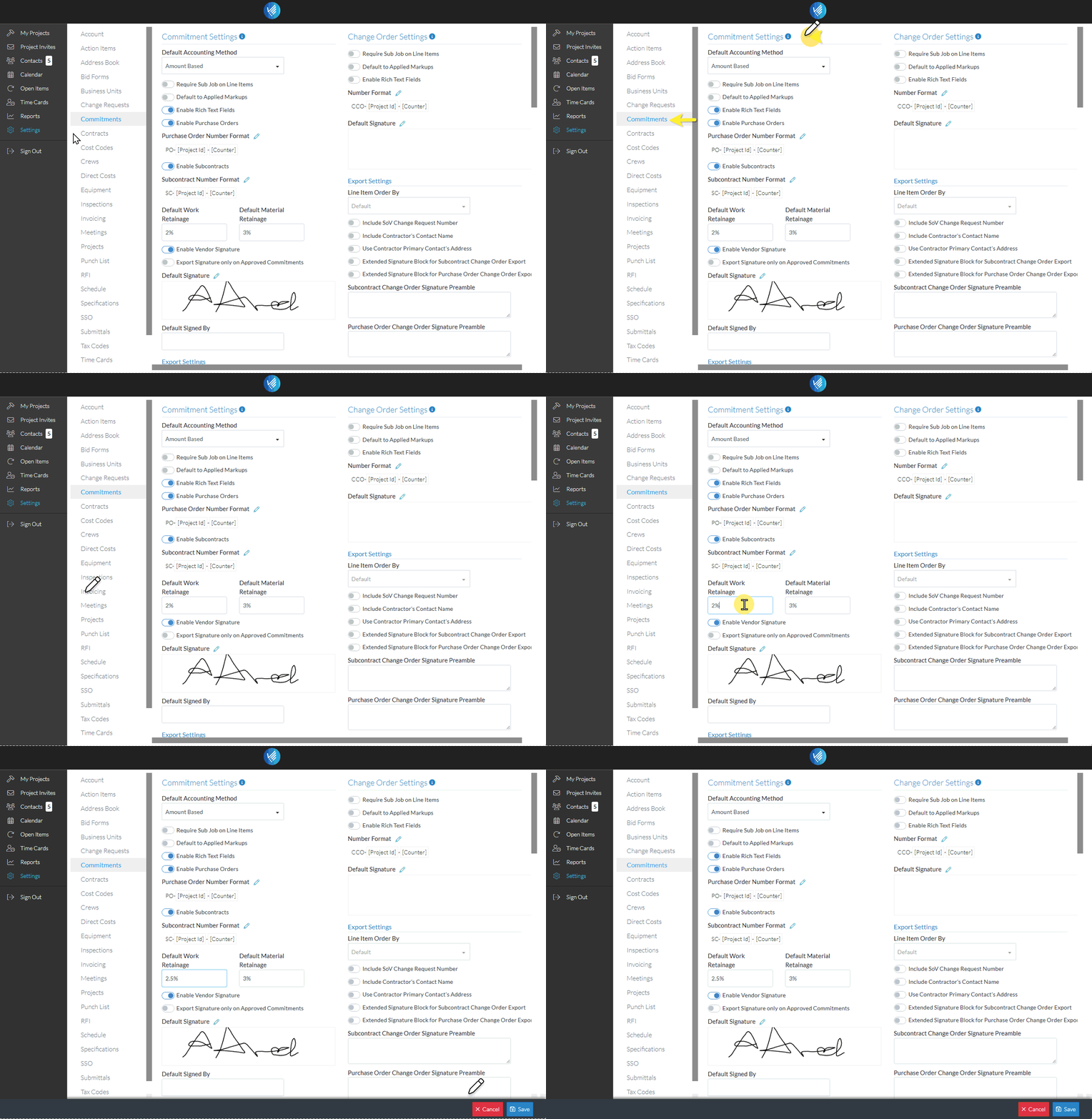
- Click the Save
 button to save the change
OR
Click the Cancel button to cancel the change.
