Financial Markup - Add/Edit - Rules
 Updated
Suggested Prior Reading
Financial Markup - Add/Edit/View - Details
Financial Markups Editing Rules
When adding or editing Financial Markups, the information on the add and view/edit form is saved and the Financial Markup displays in the Financial Markup component. However, this is still a Working Session and the Financial Markup isn't actually saved until the item is saved.
During the Working Session (after a Financial Markup is added and saved and displays in the Financial Markup component but before the Item is Saved), the Financial Markup can be edited and some changes still made. After it is saved the information that can be edited changes.
If an item can't be changed, it will have gray text and can't be clicked or the drop down will be light gray and not clickable. The following is an example:
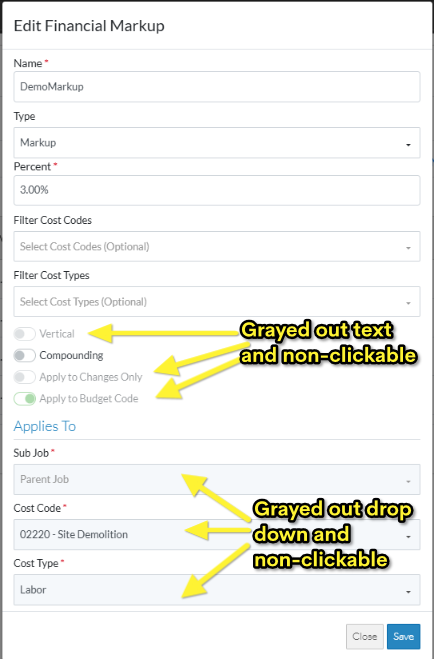
Below are the description of when each field can be edited.
Name, Type, Percent, Filter Cost Codes, Filter Cost Types, Compounding
The above fields can always be changed (as long as the item is in a Status that enables changes).
They can be changed during the Working Session or after the Item has been Saved.
Any changes in these fields will automatically be applied to the Schedule of Values.
Apply to Changes Only - Contracts
When adding Financial Markups for a Contract and the Contract is in a Status that can't be changed, the Financial Markup can still be added for the Contract, however, the Apply to Changes Only option is set on by default and can't be changed (because the Financial Markup can only be applied to Change Orders). This applies to the add or edit.
Vertical Option and Apply to Budget Code
If Apply to Budget Code is going to be used, the Vertical option can not be turned on (as Apply to Budget Code creates a Line Item where as Vertical is putting the Financial Markup value in the totals, so they can not co-exist).
- If Vertical is turned off and Apply to Budget Code is turned on, then Vertical grays out and can't be changed.
- If Vertical is turned on and Apply to Budget Code is turned on, Vertical automatically gets set to off, then is grayed out and can't be changed.
Apply to Changes Only and Apply to Budget
After a Financial Markup is added and the item is changed (i.e. the Working Session is saved and ended), then the
Apply to Changes Only and
Apply to Budget
Can not be changed. Once these are set, they can't be changed after the Working Session is ended and the item has been saved.
Next Steps
OR
