Change Request Specific RFQs - Delete
 Updated
Suggested Prior Reading
Change Request Specific RFQs - Overview
Change Request Specific RFQs - Accessing
To Delete an Existing RFQ
This is help for deleting an existing RFQ from the Change Request - View/Edit form via the RFQs component
RFQs can not be deleted if they are Approved. RFQs in any other status can be deleted (See RFQ – Status for more information).
- Access the RFQ - View/Edit form, see Change Request Specific RFQs - View/Edit.
Note* The following shows the View function by clicking on the View button for a Change Request. For more ways to invoke the view/edit, see Change Request Specific RFQs - View/Edit.
 - Scroll to the bottom of the form.
- Click the Delete
 button.
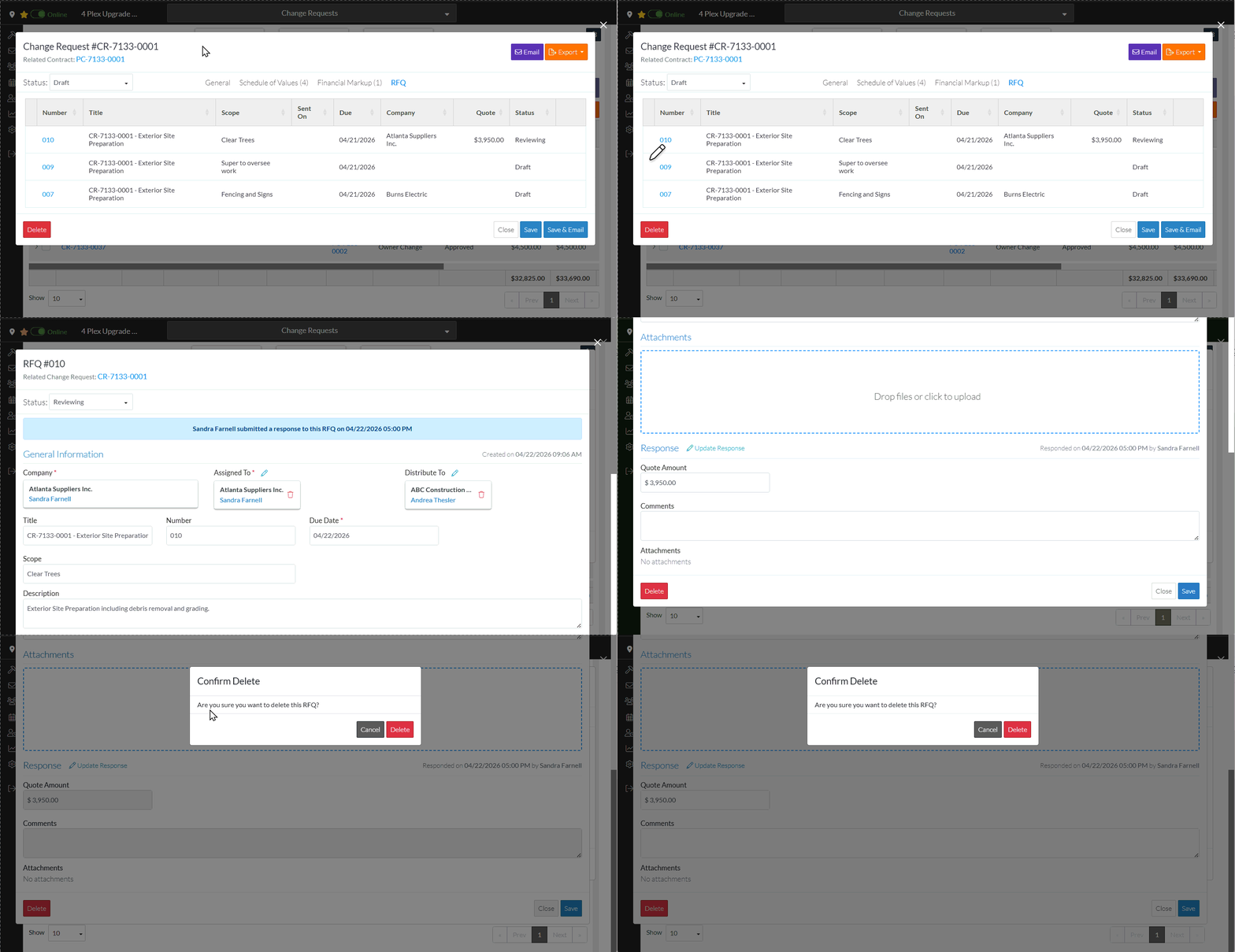
A confirmation prompts appears confirming the Delete.
- Click the Delete
 button to delete the RFQ. The Change Request RFQ Specific List displays. See Next Steps below.
OR
Click the Cancel button to cancel the delete. The RFQ - View/Edit displays, see Change Request Specific RFQs - View/Edit.
