Change Requests - List of all RFQs - Overview
 Updated
Suggested Prior Reading
RFQs - Create and Manage - Overview
Change Request - List of all RFQs
A Request for Quote (RFQ) is used to request additional work or a change in the work and/or a price quote from a subcontractor or vendor. See RFQs - Overview for more information.
Once an RFQ is created, it can be viewed and managed: edited, deleted, the status updated, responses submitted or the request sent to Vendors or Subcontractors.
RFQs that have been created can be viewed and managed from multiple places and in multiple ways. This help is for accessing RFQs directly from the Change Requests on the Project Navigation Menu. See RFQs - Create and Manage - Overview for more information. (For help on accessing RFQs from the Change Request - View/Edit form via the RFQs component, see Change Request Specific RFQs - Overview).
List of all RFQs
On the Change Requests selected from the Project Navigation Menu, RFQs are an option on the List Navigation menu.
When this is selected, a list of all RFQs are displayed.
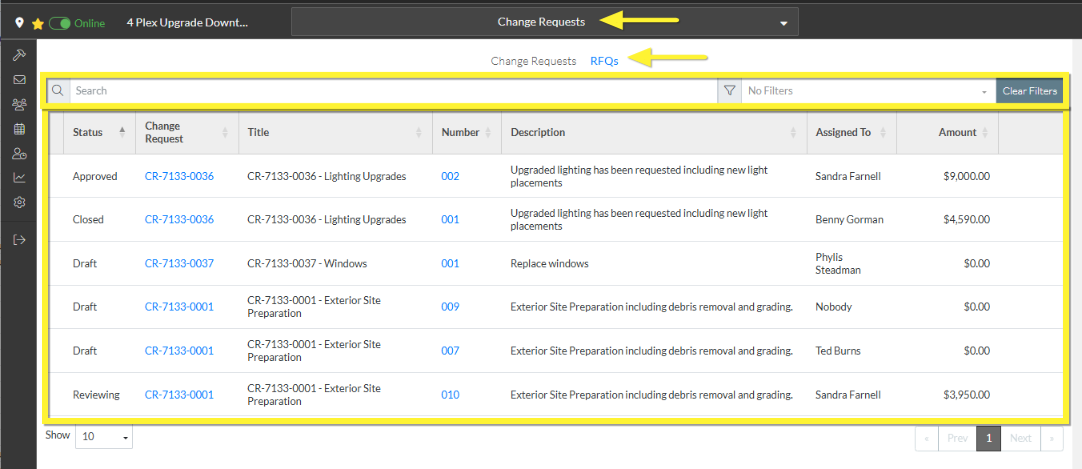
RFQs can not be added from this list, but they can be viewed and then edited, deleted, the status updated, responses submitted or the request sent to Vendors or Subcontractors.
The list can be searched and filtered.
The columns on the RFQ List can be sorted.
For more information, see Change Requests - List of all RFQs - Layout and Navigation.
Next Steps
Access the RFQ Component on the Change Request - View/Edit form, see Change Requests - List of all RFQs - Accessing.
