Contract - Financial Markups - Layout and Navigation
 Updated
Suggested Prior Reading
Contract - Financial Markup - Layout and Navigation
The Financial Markups is a component that displays on the Contract form during the add of a New Contract (see Contract – New - Form Layout and Navigation) or edit of an existing Contract (see Contract – View/Edit - Form Layout and Navigation).
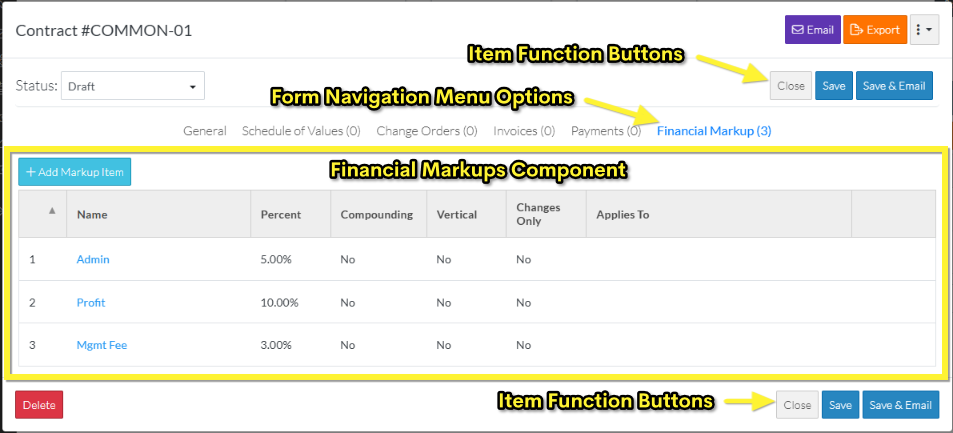
The Financial Markup for items are accessed through the Form Navigation Menu Options and by clicking on the Financial Markups text on the menu item. Note* The number of Financial Markup entered is displayed in brackets next to the text for quick reference.
When the Financial Markups option is selected, the Financial Markups component is displayed in the middle section of the form.
The following is the display of the Financial Markup Component when Markups are entered.
The following is the display of the Financial Markup Component without any information entered.

The Financial Markups component is the same for an add or edit, however the top and bottom of the form above and below the Financial Markups component and including the Form Navigation Menu Options appears differently based on if this is a new Contract or editing of an existing Contract.
The Financial Markups component is a list of all the Financial Markups. It is where
- Financial Markup can be added
- Financial Markup can be edited
- Financial Markup can be deleted
However, none of the changes are actually saved for the Financial Markups, until the entire Item is saved. This is done via the Item Function Buttons that appear at both the the top and bottom of the form (for easy access).
While Financial Markups are being added, edited or deleted and before the entire item is saved, this is considered a working session. The Save or Save & Email Item Function Buttons must be used to save the entire item and includes saving the Financial Markups. The Save or Save & Email Item Function Buttons apply to the entire item, not just the Financial Markups Component; they can be invoked from any component and will save all information on all Components.
Contract Status Impact on Financial Markups (limits on adding & editing)
For a Contract, the Financial Markups can apply to:
- The Contract itself
- Change Orders for the Contract
- Change Requests for the Contract
If the Contract is in a status that doesn't enable editing, new Financial Markups can't be added for the Contract, however, from this form Financial Markups can still be added that apply to Change Orders for the Contract or Change Requests for the Contract. Note* Entering them at the Contract level, gives the option of copying these Financial Markups to any/all Change Order or Change Requests created to easily apply the same Financial Markups. Financial Markups can also be entered specifically for a Change Order or Change Request but apply only to that specific item.
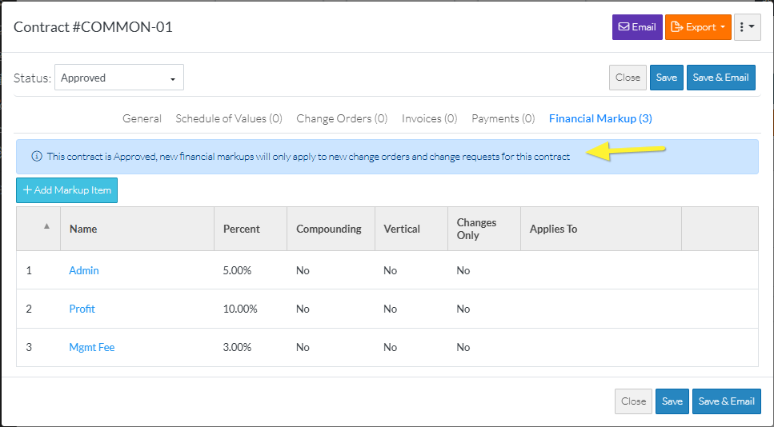
If the Contract is in a status that doesn't enable editing of the Contract, a message displays at the top of the Financial Markups component indicating the Status of the Contract and that any Financial Markups added will only apply to new change orders and change requests for this contract (New ones entered won't apply to or change the Contract itself).
There is still an ability to view the Financial Markups for the Contract although its view only and it can't be changed.
Contract Change Request Impact on Financial Markups (limits on adding & editing)
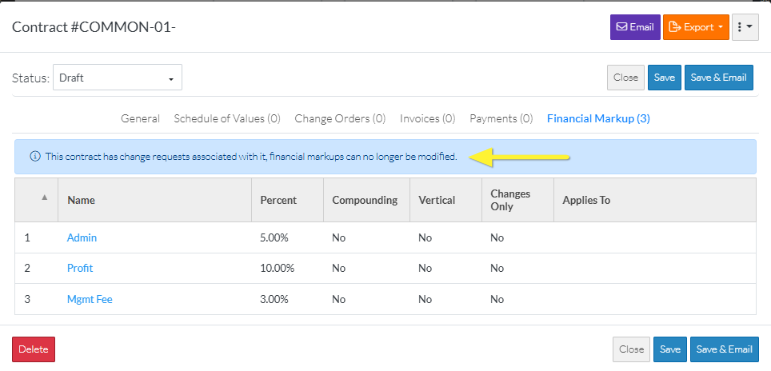
If a Contract has a Change Request created for it, the Financial Markups can not be changed. A message appears indicating that.
Next Steps
Review overall how Financial Markups work, see Financial Markup - Overview.
Maintain Financial Markups, see Contract - Financial Markups - Maintaining.
