Contract - Financial Markups
 Updated
Suggested Prior Reading
Contracts - Financial Markups Overview
A Schedule of Values is setup for a Contract to outline the details of the Contract with the Owners/Architects. See Contract - Schedule of Values for more information.
Financial Markups can be created that then automatically apply to the Contract - Schedule of Values to do things like:
- Apply Profit Markup
- Apply Overhead Markup (such as administrative, project management or other overhead)
- Calculate Taxes
Financial Markups automatically calculate and impact the display of the Schedule of Values once they are entered.
Financial Markups can display on each individual line item, as a separate Line Item or as a total overall on the Contract. One or multiple Financial Markups can be setup as required. See Financial Markup - Overview for more information on how Financial Markups are used.
The Contract - Financial Markups can be entered/maintained:
- During the Add of a new Contract (see New Contracts)
OR
- During the edit of an existing Contract (see Contracts - View/Edit), if the Contract is in a status that enables editing and Change Requests have not been created for the Contract (see Editing Financial Markups below).
Financial Markup Component
The Financial Markups is a component that displays on the Contract form during the add of a New Contract (see Contract – New - Form Layout and Navigation) or edit of an existing Contract (see Contract – View/Edit - Form Layout and Navigation).
For details on the Financial Markup component generic layout and Navigation, see Financial Markup - Navigation and Layout.
Copying and Inheriting the Contract Financial Markups
Financial Markups on the Contract:
- Are automatically copied to and applied to any Change Requests for that Contract (and can not be changed on the Change Request)
- Can optionally be copied to Contract Change Orders (and then can be edited on the Contract Change Order)
Apply to Changes Only
The Financial Markups created for a Contract can be set to apply to apply only to Contract Change Orders (and not the Contract nor any Change Requests)
- When setting up Financial Markups for the Contract, there is an option to apply it to only the Changes i.e. Contract Change Orders. If this is set, it wouldn't apply to the Contract or any Change Request, but can be easily copied to any or all Change Orders created.
- This can be set manually during the add/edit of a Financial Markups OR
- The system will set it automatically if a Financial Markup is added for the Contract but the Contract is in a Status that doesn't enable changes to the Contract.
For more information, see Financial Markup - Apply to Changes Only.
Approved Contracts
If a Contract is Approved:
- The existing Financial Markups that apply to the Contract can no longer be edited.
- New Financial Markups can be added but they will be automatically set to apply to Changes Only (see above).
Financial Markups and Change Requests
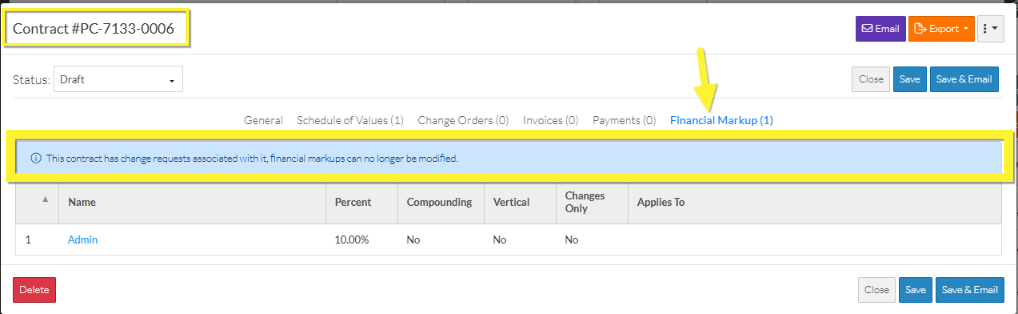
The Contract Financial Markups can no longer be changed (added, edited or deleted even for Changes Only) once a Change Request has been created for that Contract (as the Change Request will have inherited those). (See Contract - Financial Markups - Accessing during Edit).
Next Steps
Review overall how Financial Markups work, see Financial Markup - Overview.
Access the Contract Financial Markups, see Contract - Financial Markups - Accessing and Maintaining During Add OR Contract - Financial Markups - Accessing and Maintaining During Edit.
