Purchase Order - View/Maintain - General Component - View (Examples & Steps)
 Updated
Suggested Prior Reading
Purchase Order - View/Maintain - General Component (Overview)
Purchase Order - General Component - View Only
This help applies to Users who have View only or just View and Edit SOV permissions on Commitments and are viewing the General component on the Purchase Order - View/Maintain form (see the above Suggested Prior Reading for more information).
For users with these permissions, none of the Core Fields in the Other section display (see Purchase Order - General - Other).
All of the fields that do display are in either a light or dark shade of gray and are view only and can't be changed, including the Status.
The following gives some different examples of how the General component looks in View Only or View and Edit SOV permissions.
For more information on the overall layout of the Purchase Order form, see Purchase Order - View/Maintain - Form Layout.
Click here for an example of a User with View and Edit SOV Permissions and View Permissions on Commitment Change Orders and Payables Invoices
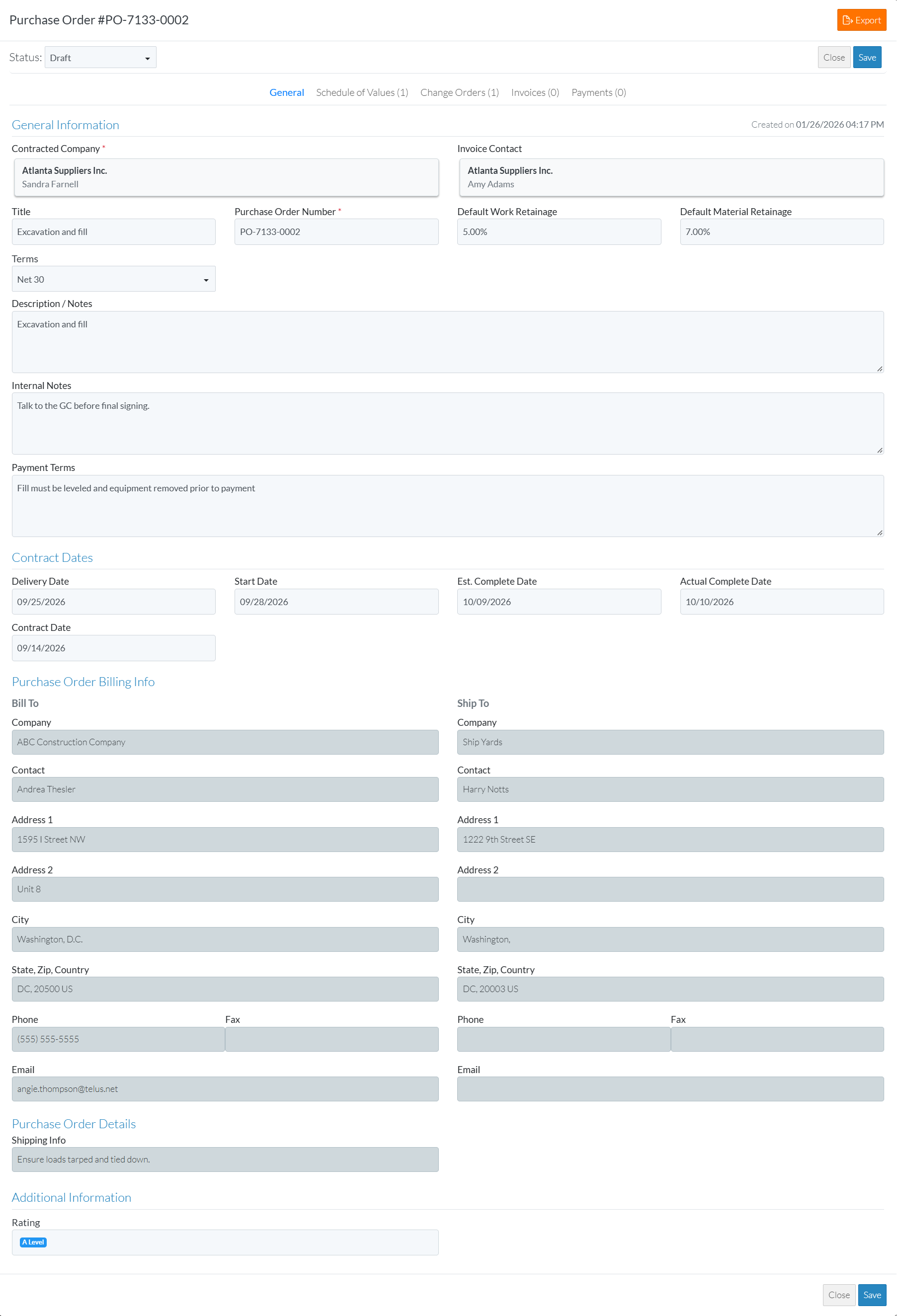
The following example shows a User with View and Edit SOV permissions only on Commitments and at least View permissions on Commitment Change Orders and Payables Invoices.
The Form Navigation Menu options show the General, Schedule of Values, Change Orders, Invoices and Payments components (as the User has at least View access to those items).
There is an Export
 button to export the Purchase Order to a PDF.
There is both a Save
 and Close
 button (as this user has Edit SOV permission so they can edit the Schedule of Values and therefore there is a Save button to save any of those changes to the Schedule of Values). The buttons appear at both the top and bottom of the form.
Click here for an example of a User with View Only Permissions and No Permissions on Commitment Change Orders and Payables Invoices
The following is an example of the top portion of the form only, with a user with View Only permissions on Commitments and no permissions on Commitment Change Orders and Payables Invoices:
The Form Navigation Menu options show only the General and Schedule of Values components (as the User has no permissions to Commitment Change Orders and Payable Invoices).
There is an Export
to PDF button.There is only a Close
button (as no information can be changed, the user has View only to both the General Component and the Schedule of Values).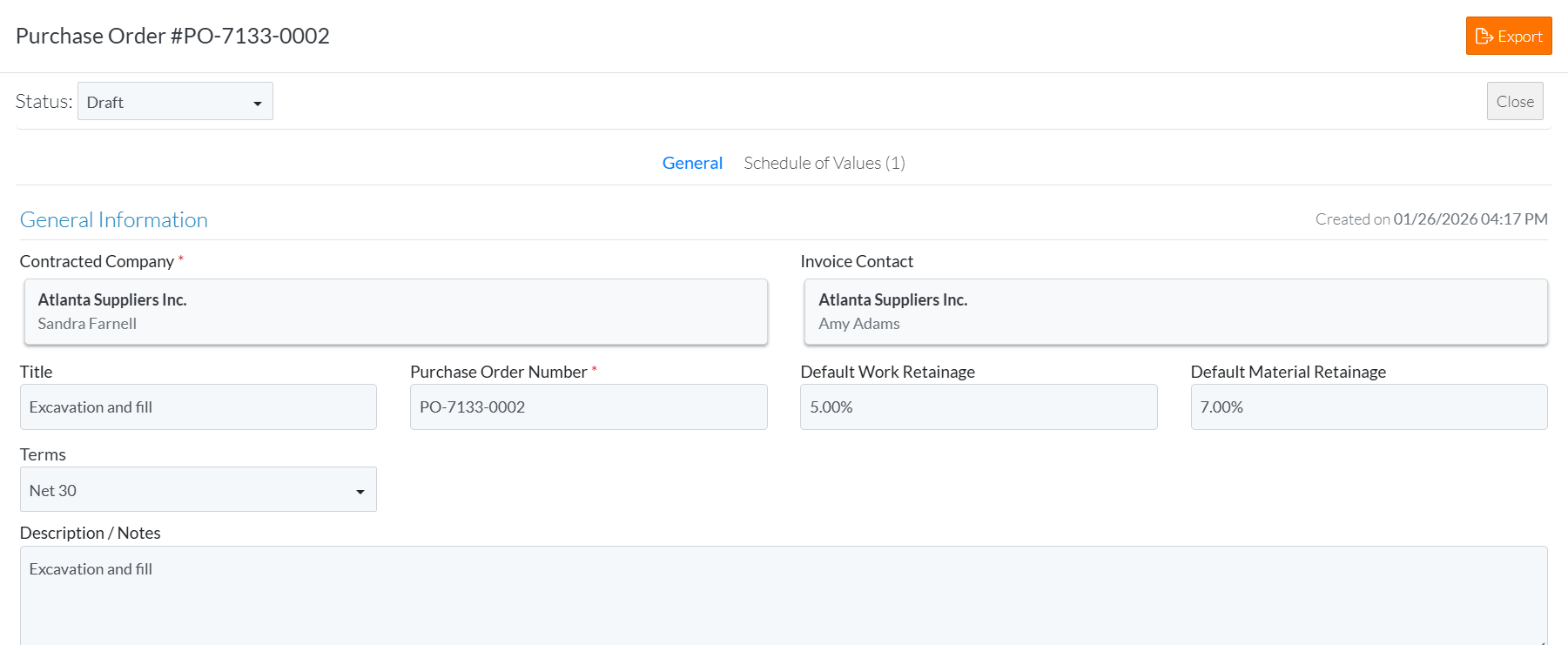
To View the information on the General Component
- If the Purchase Order - View/Maintain form is not displayed, select the Purchase Order to view, see Commitment - View.
- Ensure the General Component is selected, see Purchase Order - View/Maintain - Form Navigation.
- Scroll up and down the form to view the information as required.
For definitions of Purchase Order Core Fields, see Purchase Order - Fields - Definitions. - Add, Edit or View other information for the Purchase Order, see More Information below.
OR
Click the Close button (at the top or bottom of the form) to close the form.
Click here for more information on the Close function.
If no information was changed or entered, the list the function was invoked from displays, see Next Steps below.
If information was changed, then an additional prompt displays indicating there were changes and additional prompts on what to do.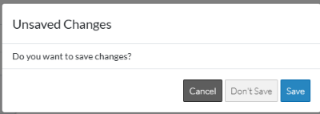
Click the Cancel button to cancel the Close action and return to the Purchase Order - View/Maintain form (see the steps above)
OR
Click the Don't Save button to cancel changes to the Purchase Order. The list the function was invoked from displays, see Next Steps below.
OR
Click the Save button to save the Purchase including any information on the General, Schedule of Values or Financial Markups components (if applicable). The list the add or edit function was invoked from displays, see Next Steps below.
More Information
To Export a Commitment, see Purchase Order - View/Maintain - Export.
To view/maintain Schedule of Values, see Commitment - Schedule of Values (Overview).
To view/maintain Change Orders, see Commitment Change Orders - Overview.
To view/maintain Invoices, see Commitment Invoices - Overview.
To view/maintain Payables, see Commitment Payables - Overview.
