Settings - Change Requests
 Updated
Suggested Prior Reading
Overview
Change Requests are proposals to change the original Contract with Clients/Owners. See Change Requests - Overview for more information.
Contract Change Order Administrators can setup and manage Change Request settings that apply overall to how the Change Requests function. This includes:
- Change Request Settings - General settings around how the Change Request works
- Export Settings for Change Requests - Settings around how the export of Change Requests to a PDF works
- Change Request Custom Fields - Setup Custom Fields for Change Request s i.e. fields specific to this organization that are not a default part of the Change Requests
Navigate to the Change Request Settings
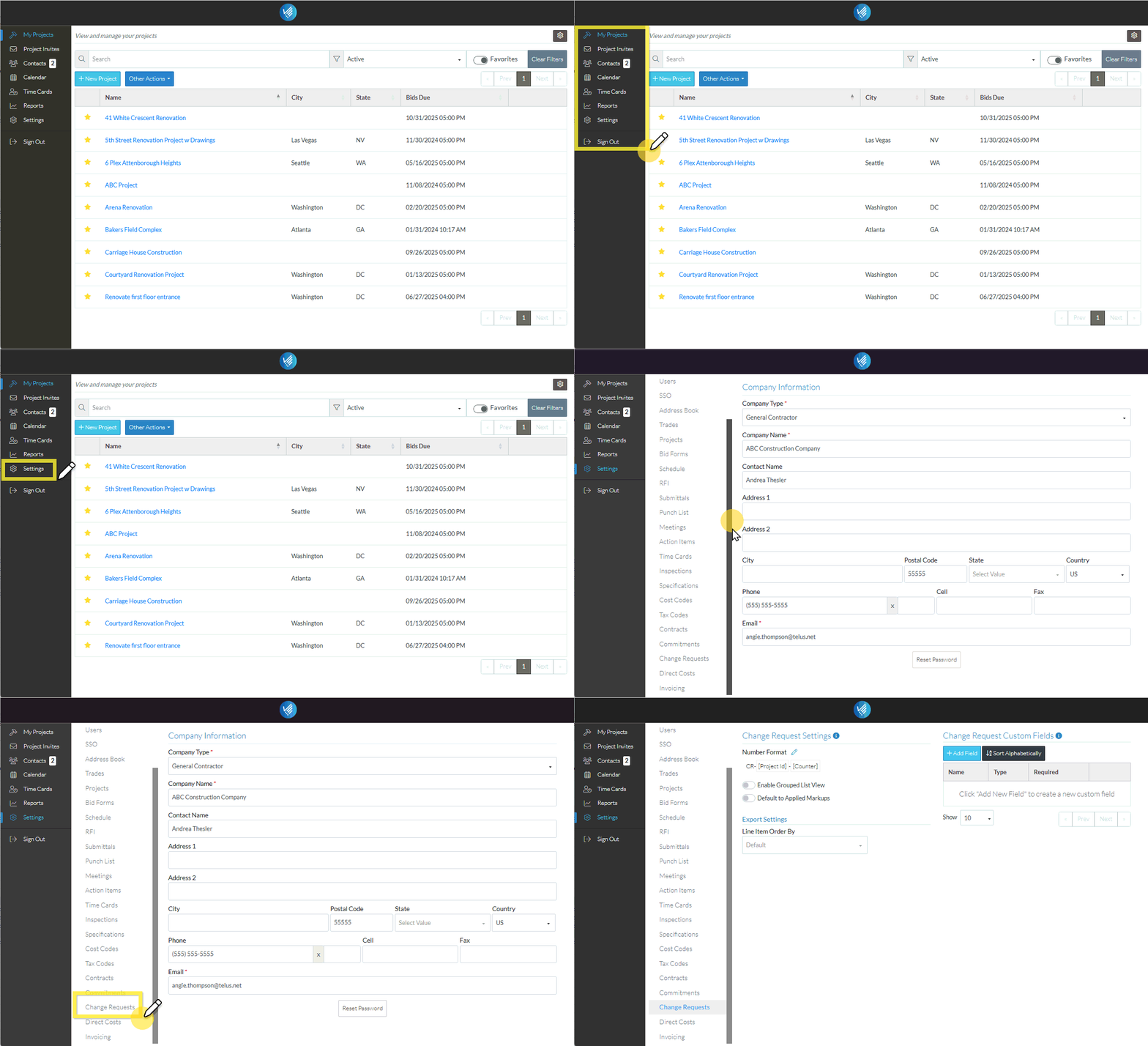
The following are the steps for navigating to the Settings for Change Requests:
- Login with an Administrator account (i.e. one that has Admin permissions on Contract Change Orders, see User Types - Company - Permissions - Project Features).
- From the Global Navigation Menu, click Settings. The Settings menu and Company Information form appears.
- Scroll to closer to the bottom of the list.
- Click on Change Requests. The Change Request Setting form appears.
Next Steps
See the following for more information on each section:
Settings - Change Requests - Change Request Settings
