Change Requests - List of all RFQs - Delete
 Updated
Suggested Prior Reading
Change Requests - List of all RFQs - Overview
Change Requests - List of all RFQs - Accessing
Change Requests - List of all RFQs - Layout and Navigation
To Delete an Existing RFQ
This is help for deleting an existing RFQ from the List of all RFQs accessed from Change Requests on the Project Navigation Menu and via the RFQs in the Lists Navigation Menu.
RFQs can not be deleted if they are Approved. RFQs in any other status can be deleted (See RFQ – Status for more information).
- Access the RFQ - View/Edit form, see Change Requests - List of all RFQs - View/Edit.
Note* The following shows the View function by clicking on the View button for a Change Request. For more ways to invoke the view/edit, see Change Requests - List of all RFQs - View/Edit for more ways to invoke the edit.
 - Scroll to the bottom of the form.
- Click the Delete
 button.
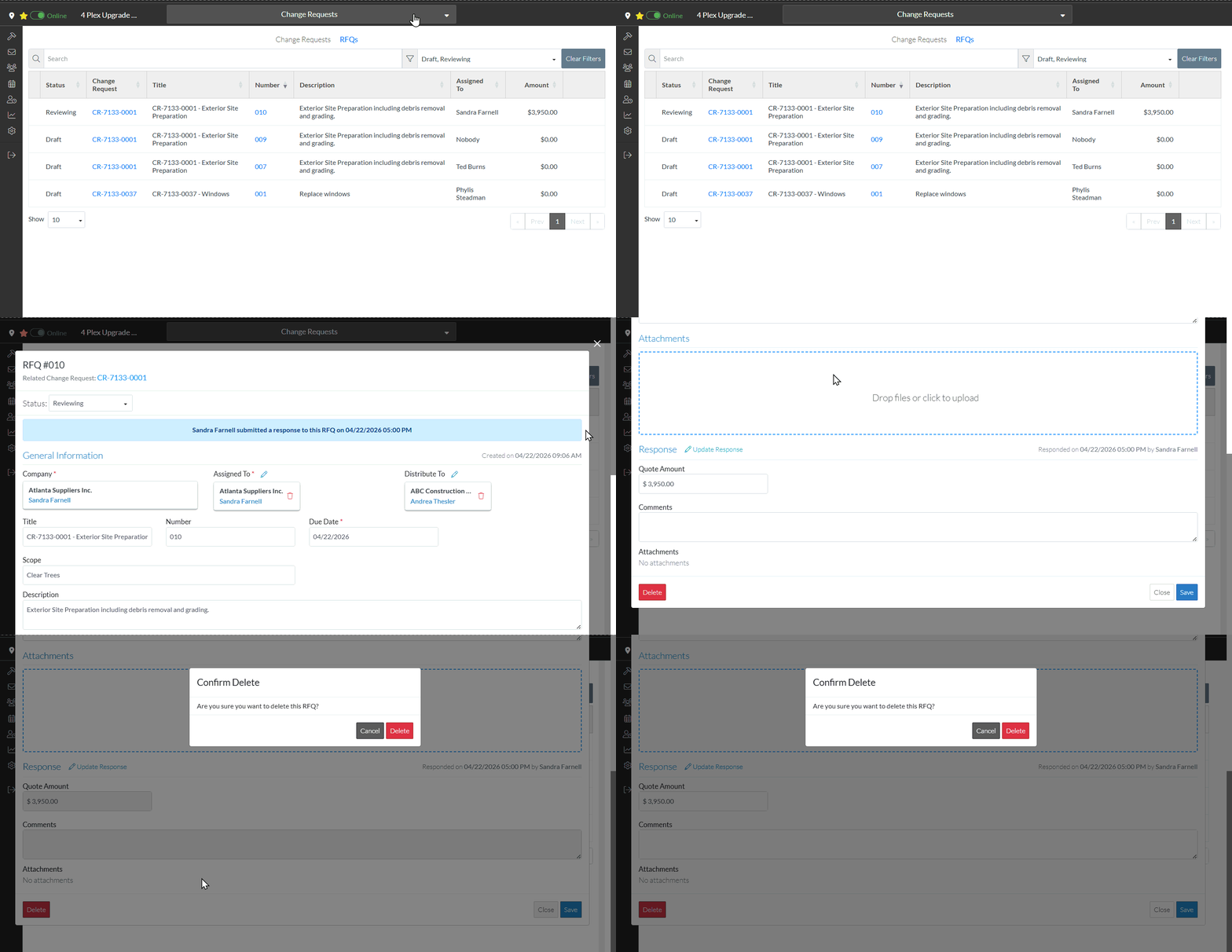
A confirmation prompts appears confirming the Delete.
- Click the Delete
 button to delete the RFQ. The RFQ List displays. See Next Steps below.
OR
Click the Cancel button to cancel the delete. The RFQ - View/Edit displays, see Change Requests - List of all RFQs - View/Edit.
