Contract Change Order - Schedule of Values – Create - Layout and Navigation
 Updated
Suggested Prior Reading
Contract Change Order - Schedule of Values
Contract Change Order - Schedule of Values - Create During Add
OR
Contract Change Order - Schedule of Values - Create During Edit
Schedule of Values - Create - Layout and Navigation
The Schedule of Values is a component of a Contract Change Order.
Creation of a Schedule of Values is assuming that no Line Items have yet been entered. (If Line Items are entered and the Schedule of Values saved, see Contract Change Order - Schedule of Values – Maintain - Layout and Navigation.
The Schedule of Values can be created during the add of a new Contract Change Order or edit of an existing Contract Change Order (if it wasn't created previously). It is accessed through the Form Navigation Menu Options during the add/edit by clicking on the Schedule of Values text on the menu item. See Contract Change Order - Schedule of Values - Create During Add OR Contract Change Order - Schedule of Values - Create During Edit.
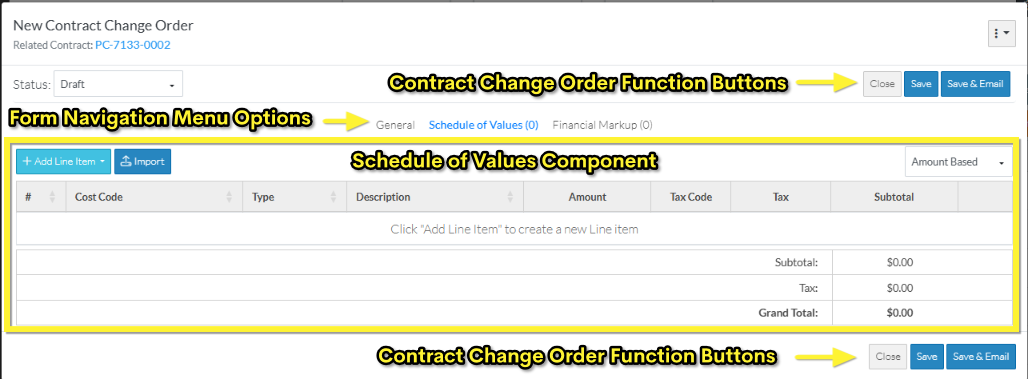
- The Schedule of Values component is displayed in the middle section of the form New Contract Change Order form.
- Directly above the Component is the Form Navigation Menu Options which is used to navigate to the other components.
- Directly below the Component, are the Contract Change Order Function Buttons display.
Both the Form Navigation Menu Options and the Contract Change Order Function Buttons apply to the entire Contract Change Order including the General, Schedule of Values and Financial Markups. They are part of the top and bottom sections of the New Contract Change Order form and don't change regardless of what component is displayed. For more information on the New Contract Change Order form layout regardless of which Component is selected, see Contract Change Order – Add - Form Layout and Navigation.
The following is an example of a the New Contract Change Order form with the Schedule of Values Component displaying that has no line items entered.
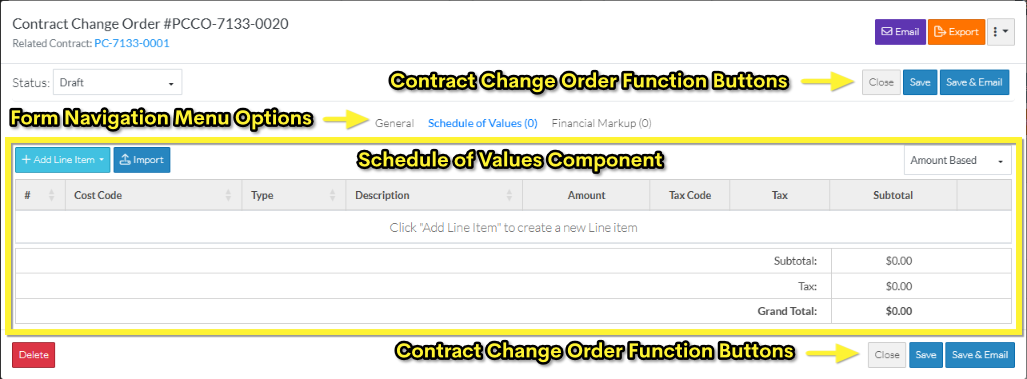
The following is an example of an edit of an existing Change Request on the Change Request View/Edit form with the Schedule of Values Component displaying that has no line items entered.
Schedule of Values Component
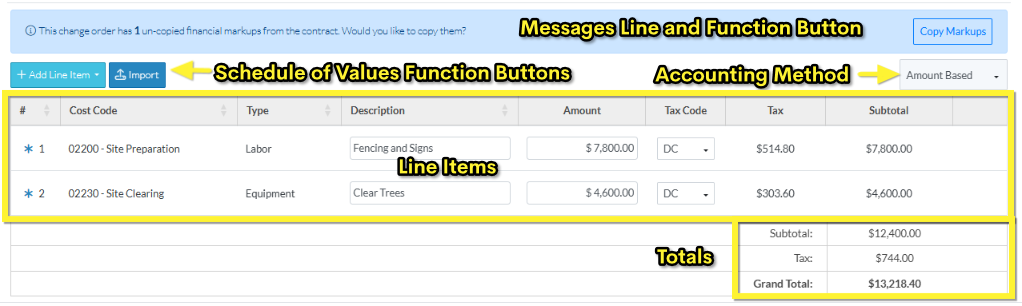
The Schedule of Values component consists of:
- Messages Line and Function Button (this displays only if this is a creation of a new Contract Change Order and there are Financial Markups on the Contract)
- Schedule of Values Function Buttons (functions specific to the Schedule of Values only)
- Accounting Method
- The list of the Line Items in the Schedule of Values
- Totals section
The status of the Contract Change Order will determine the type of functionality available (more details below).
However, none of the additions or changes are actually saved for the Schedule of Value Line Items, until the entire Contract Change Order is saved. This is done via the Contract Change Order Function Buttons that appear at the top and bottom of the form.
While Line Items are being added, edited or deleted and before the entire item is saved, this is considered a working session. The Save or Save & Email Item Function Buttons must be used to save the entire Contract Change Order and includes saving the Schedule of Values. The Save or Save & Email Item Function Buttons apply to the entire item, not just the Schedule of Values Component; they can be invoked from any component and will save all information on all Components.
Line Items
There are Schedule of Values Function Buttons to:
- Add individual Line Items - Either by:
- Creating a new Line Item manually
- Adding Line Item(s) from other Approved Change Requests
- Import Line Items from a File
The existing Line Items can also be:
- Edited inline within the Schedule of Values (for the information that can be edited)
- Deleted
The following is an example of a the New Contract Change Order form with the Schedule of Values Component displaying that has no line items entered.

The following is an example of an edit of an existing Contract Change Order on the Contract Change Order View/Edit form with the Schedule of Values Component displaying that has no line items entered.
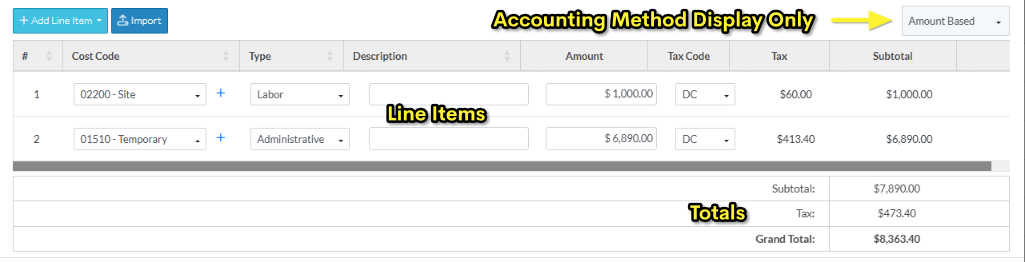
For more information on Sub Jobs, see Sub Jobs - Overview (Note* Sub Jobs are not shown in these examples).
Totals Section
Each Schedule of Values has a Totals section:
- Subtotal
- Taxes (if applicable)
- Grand Total
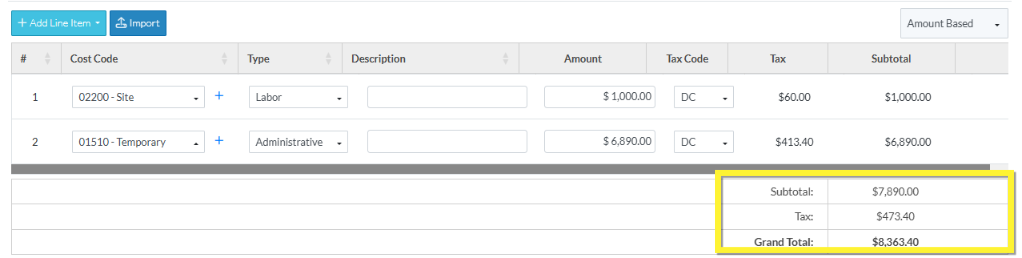
The Subtotal is the Subtotal of all the Line Items which is the Amount (or Unit Price x quantity) plus the Financial Markups if applicable).
The Taxes are the total of all Taxes for all Line Items. The Tax columns on the Schedule of Values Line Items displays only when Tax Codes have been setup by the System Administrator (see Settings - Tax Codes for more information).
The Grand Total is the Subtotal plus Taxes.
This information is automatically calculated. As Line Item values are entered it automatically updates to reflect the information (but the form has to be saved to retain the changes).
Next Steps
Copy Financial Markups from the Contract (if applicable), see Contract Change Order - Schedule of Values - Copy Financial Markups from Contract.
Add a Schedule of Values Line Item, see Contract Change Order - Schedule of Values - Add Line Item.
Bulk Import Schedule of Values Line Items, see Contract Change Order - Schedule of Values - Import.
Edit a Schedule of Values Line Item created from a Change Request, see Contract Change Order - Schedule of Values - Edit Line Items created from a Change Request.
Edit a Schedule of Values Line Item added during this session, see Contract Change Order - Schedule of Values - Edit Line Item (before Save).
Delete a Schedule of Values Line Item, see Contract Change Order - Schedule of Values - Delete Line Item.
