RFQ - View/Edit - Resend Request in Draft Status
 Updated
Suggested Prior Reading
Change Request Specific RFQs - View/Edit
OR
Change Requests - List of all RFQs - View/Edit
RFQ - View/Edit - Draft Status
Resend Request
The Resend Request function is available if the RFQ is in a Draft Status but when the RFQ has already been sent to a Company/Contact and was then manually set to the Draft Status). (See RFQ - View/Edit - Draft Status Status for more information).
To resend a request for a quote to the Company/Contact entered:
- View or Edit the RFQ, see the following for the appropriate list the view/edit is being invoked from:
Change Request Specific RFQs - View/Edit
OR
Change Requests - List of all RFQs - View/Edit
The RFQ - View/Edit form displays. See RFQ - View/Edit - Layout and Navigation - Draft Status for more information. - Click on the Resend Request
 button.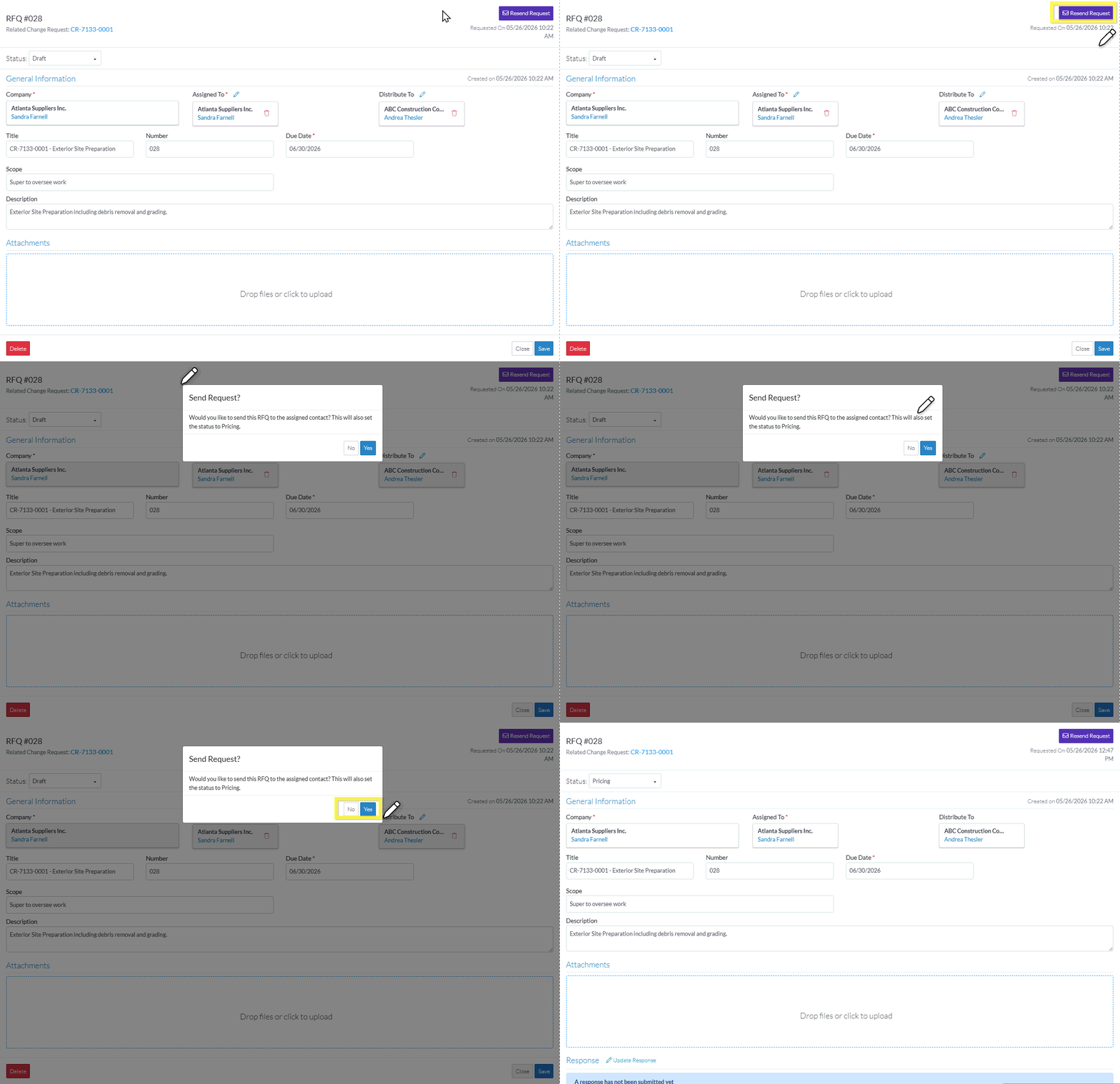
- A prompt appears confirming that the request should be sent to the Company/Contact and indicating that if it is sent, the Status will also be automatically set to Pricing.
Click Yes to resend the Request.
OR
Click No to cancel resending of the Request.
The Request - View/Edit form displays.
If the Request was sent
- The Requested On will be updated with the date and time it was sent.
- The Status is automatically set to Pricing. - Continue editing the RFQ, see RFQ - View/Edit - Pricing Status.
OR
Click the Close button to close the RFQ form, see Next Steps below.
Next Steps
The list the View/Edit was invoked from displays.
- If it was invoked from the Change Request - View/Edit form via the RFQs component, see Change Request Specific RFQs - Overview.
- If it was invoked from the Change Requests on the Project Navigation Menu and via the RFQs in the Lists Navigation Menu, see Change Requests - List of all RFQs - Overview
