Contract Specific Change Orders List - Overview
 Updated
Suggested Prior Reading
Contract Change Orders - Overview
Contract Specific Change Orders List
For a Contract, the Change Orders specific to that Contract can be viewed and then maintained (added, edited or deleted etc.).
This is done via a Change Order Component that displays on the Contract View/Edit Form.
The middle section of the Contract View/Edit form displays the Component selected from the Form Navigation Menu Options (see Contract – View/Edit - Form Layout and Navigation for more information on the Contract View/Edit form).
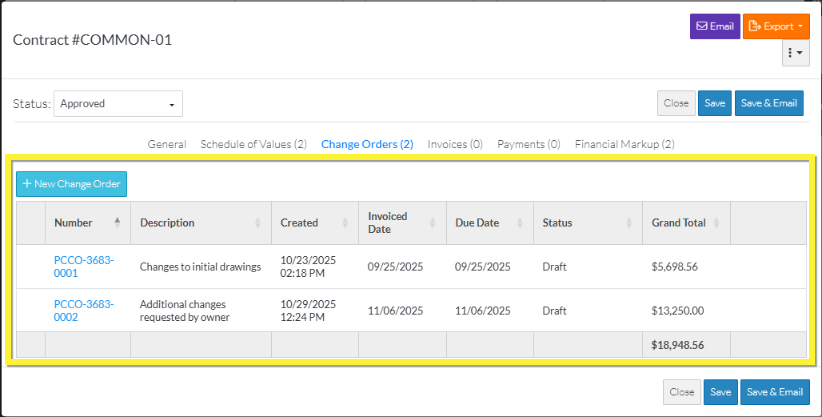
When Change Orders are selected, the Change Order Component displays in the middle section with:
- A Function button or informational text (depending on the Status)
- A list of the Change Orders specific to that Contract (or it may be blank if no Change Orders have been added)
- Grand Totals
The functionality available on the Change Order Component depends on the Contract Status:
- New Change Orders can be added if the Contract has an Approved or Complete Status
- Existing Change Orders can be viewed/edited (regardless of Contract Status)
- Change Order can be deleted but only if the Status is Draft, Out for Bid or Out for Signature
Note* This list enables display of all Change Orders specific to a Contract. Alternatively, there is functionality to view all Change Orders for all Contracts for the Project, see Contracts - List of All Change Orders - Overview for more information.
