Change Request - Financial Markups - Layout and Navigation
 Updated
Suggested Prior Reading
Change Request - Financial Markups - Overview
Change Request - Financial Markups - Accessing and Viewing
Change Request - Financial Markup - Layout and Navigation
The Financial Markups is a component that displays on the Change Request form during the:
- Add of a New Change Request
OR
- Edit of an existing Change Request
See Change Request - Financial Markups - Accessing and Viewing for more information on adding or editing a Change Request.
The New Change Request form displays (see Change Request – Add - Form Layout and Navigation).
OR
The Change Request View/Edit form displays (see Change Request – View/Edit - Form Layout and Navigation).
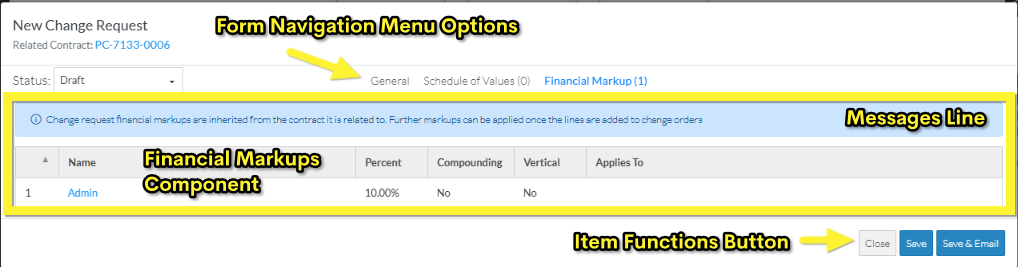
The Financial Markup for items are accessed through the Form Navigation Menu Options and by clicking on the Financial Markups text on the menu item. Note* The number of Financial Markups entered is displayed in brackets next to the text for quick reference.
When the Financial Markups option is selected, the Financial Markups component is displayed in the middle section of the form.
Click here for the Layout for a adding a New Change Request
Click here for the Layout for editing an existing Change Request
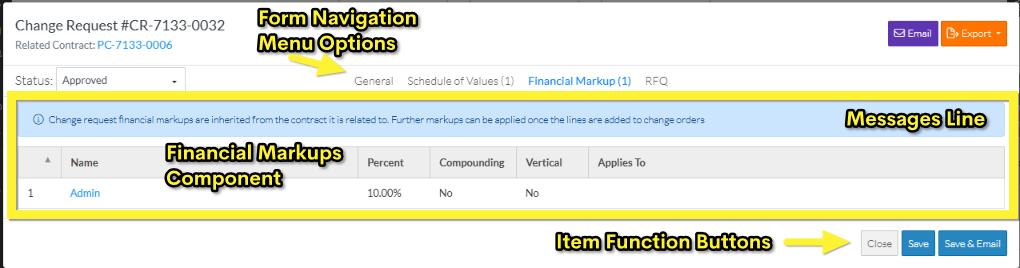
The Financial Markups component is the same for an add or edit, however the top and bottom of the form above and below the Financial Markups component appears differently based on if this is a new Change Request or editing of an existing Change Request.
The Financial Markups may have a blue messages line indicating additional information (for example the Change Request Financial Markups are inherited from the Contract and can not be edited). See Change Request - Financial Markups - Overview for more information.
Next Steps
Maintain the Change Request Schedule of Values, see:
Change Request - Schedule of Values - Create During Add
OR
Change Request - Schedule of Values - Create During Edit
OR
Change Request - Schedule of Values - Maintain
Maintain the Change Request General Information, see:
Change Request - Add - General
OR
