All Change Requests Lists - Views Examples
 Updated
Suggested Prior Reading
Change Requests - Multiple Lists and Views
Change Requests Views
Change Requests can be accessed different ways:
- Contracts - List of all Change Requests (accessed from Contracts on the Project Menu Bar)
- Change Requests List (accessed from Change Requests on the Project Menu Bar)
See Change Requests - Multiple Lists and Views for more information.
Regardless of which way the Change Requests Lists are accessed, there are two different views that could be applied to the way the list displays:
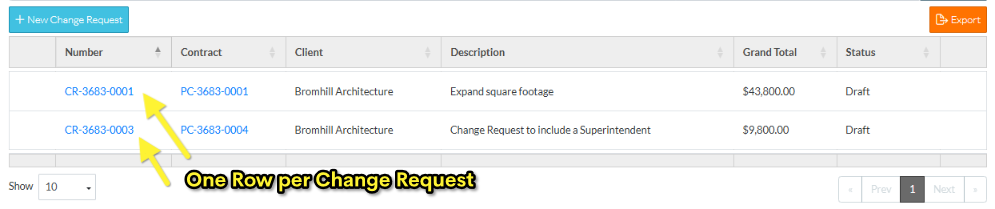
- Simple List View - displays one Row per Change Request and the columns displayed can be set
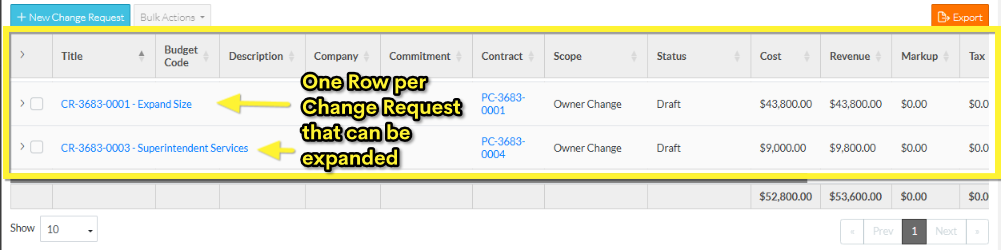
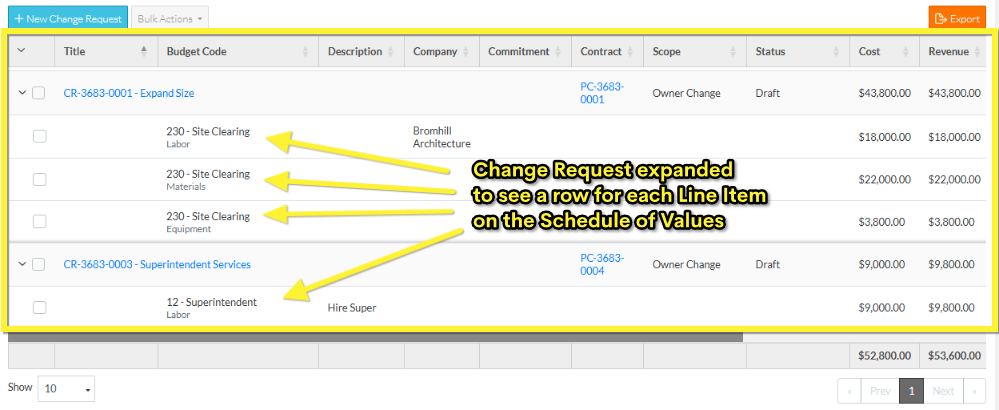
- Grouped List View - displays one row for the change request then multiple rows below that for each Line Item on the Change Request Schedule of Values. In this view, the columns displayed can not be changed. The rows can be searched.
The Change Request Administrator can set the view and that view is applied to both the above Change Requests Lists (this is a system wide setting and can't be changed by individual users). Note* There is different functionality available depending on the View.
The following are examples of each View.
Example of Simple List View
This is an example of the Simple List View mode. There is one row displayed per Change Request.
For more information on the Simple List View layout and navigation of the Change Requests List, see Change Requests List - Layout and Navigation (Simple View).
For more information on the Simple List View layout and navigation of the Contracts - List of all Change Requests, see List of all Change Requests - Layout and Navigation (Simple View).
Example of Grouped List View
This is an example of the Grouped List View.
This is the View in collapsed mode (with only the Contract displaying) and no rows for Schedule of Values Line Items displaying.
This is an example of the Grouped List View in an expanded mode with each Contract displaying its Schedule of Values Line Items in Rows below it.
For more information on the Grouped List view layout and navigation of Change Requests that are accessed via the Change Requests List, see Change Requests List - Layout and Navigation (Grouped List View).
For more information on the Grouped List view layout and navigation of Change Requests that are accessed via the Contracts - List of all Change Requests, see List of all Change Requests - Layout and Navigation (Grouped List View).
Next Steps
To change the view as a Change Request Administrator, see Settings - Change Requests.
To access Change Requests lists, see one of the following help topics below for the applicable list and view:
Click here for Grouped List View
OR
