Change Request Specific RFQs - Layout and Navigation
 Updated
Suggested Prior Reading
Change Request Specific RFQs - Overview
Change Request Specific RFQs - Accessing
Change Request - RFQs - Layout and Navigation
The RFQ is a component of a Change Request and displays all the RFQs for the Change Request. See Change Request Specific RFQs - Accessing.
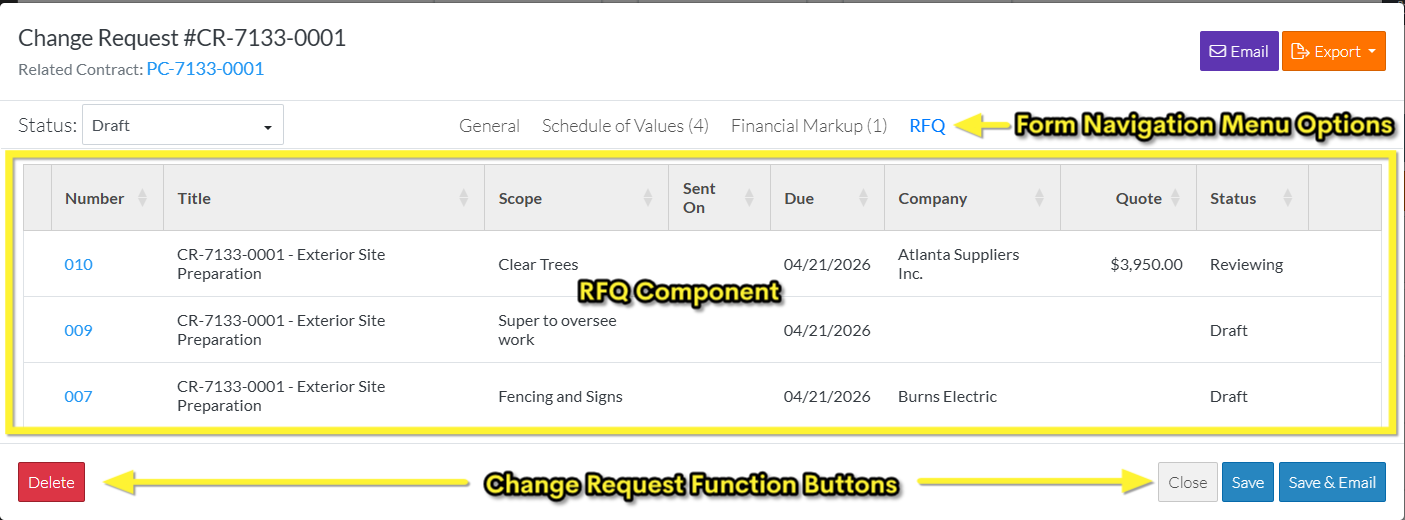
- The RFQ component is displayed in the middle section of the form Change Request View/Edit form.
- Directly above the Component is the Form Navigation Menu Options which are used to navigate to the other components.
- Directly below the Component, the Change Request Function Buttons display.
Both the Form Navigation Menu Options and the Change Request Function Buttons apply to the entire Change Request including the General, Schedule of Values and Financial Markups. They are part of the top and bottom sections of the Change Request View/Edit form and don't change regardless of what component is displayed. For more information on the Change Request View/Edit form layout regardless of which Component is selected, see Change Request – View/Edit - Form Layout and Navigation.
The following is an example of a the Change Request View/Edit form with the RFQ Component displayed and with RFQs that have already been created.
RFQs can not be created from this list. For more information on creating RFQs, see Create and Manage RFQs - Overview.
More Information
Sort the columns on the RFQ List if required, see Change Request Specific RFQs - Sort Columns.
Next Steps
View an RFQ (to then edit it, update the status, submit a response or send to Vendors or Subcontractors), see Change Request Specific RFQs - View/Edit.
Delete an RFQ, see Change Request Specific RFQs - Delete.
