Change Request - Schedule of Values - Bulk Actions - Create and Send RFQs
 Updated
Suggested Prior Reading
Change Request - Schedule of Values - Bulk Actions - Send RFQs
Bulk Actions - Create and Send RFQs
This is help for maintaining the RFQ information once Line Items are selected and the Send RFQ function is invoked, (see Change Request - Schedule of Values - Bulk Actions - Send RFQs):
The Send RFQ form displays.
There are three sections on the form:
- General Information - This is general information that will be populated on all RFQs created.
- Attachments - These are attachments that will be populated on all RFQs created
- Requests - These are the individual requests. An RFQ will be created for each one listed.
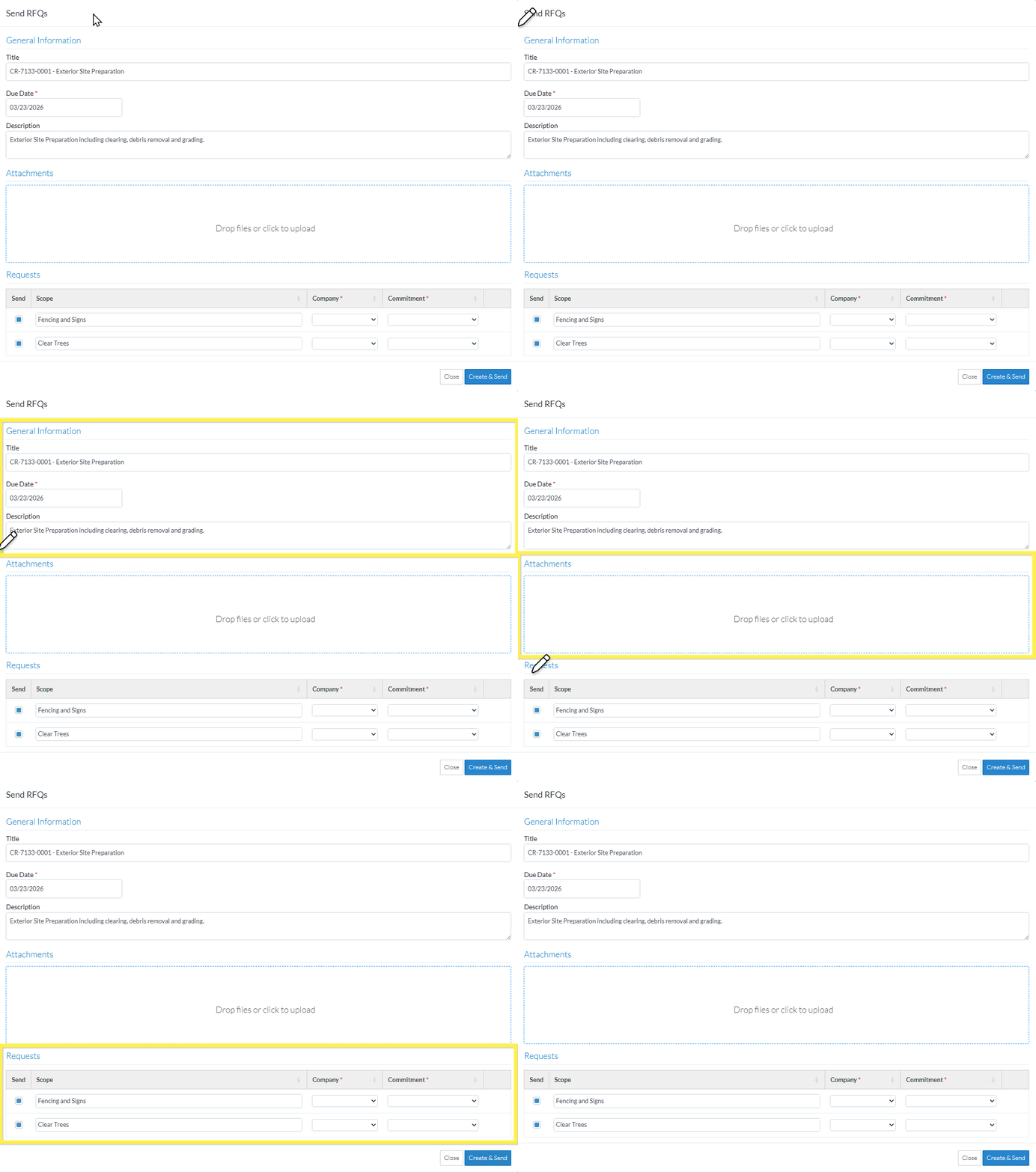
Some information will already be populated on the form from the Change Request General information and the Change Request Schedule of Values Line Items that were selected.
The following is a description of how the information is populated.
General Information
Send RFQ Information | Description of how this is populated |
Title | This is set to the Change Request Number and Title (if one was entered). They are joined together with a dash separating them. This is optional and can be changed as long as the RFQ is in a status that enables editing. |
Due Date | This is set to the current date. This is required but can be changed. |
Description | This is set to the Change Request Schedule of Values Line Item Description. This is optional and can be changed |
Attachments
This is where additional files can be uploaded so they can be accessed by the Vendor or Subcontractor.
This is not prepopulated.
Requests
For each Line Item on the Change Request Schedule of Values that was selected, an individual Request will be created automatically for each Line Item selected but then they can be maintained.
Send RFQ Information | Description of how this is populated |
Send | The Send box is filled in by default, i.e. set to be sent. It can be clicked on to remove the selection (and clicked on to add the selection back in). Only requests with this box filled in, (blue) will have requests automatically sent to the Company/Contract (they are still created).; |
Scope | This is set to the Description from the Change Request Line Item. This is optional and it can be changed if required. |
Company | If the Company was populated on the Change Request Schedule of Values Line Item, this will be set to that Company (and the associated Contact) (but it can be changed if required). If the Company was not populated on the Change Request Schedule of Values Line Item, it will be blank. This is required. It can also be automatically populated by selecting a Commitment (and then the Company/Contact for the Commitment is populated here automatically). Once an RFQ is created with the Company/Contact it can not be changed. When the RFQ is approved, the Company is automatically updated on the Change Request Schedule of Values Line Item. |
Commitment | If the Commitment or Commitment Change Order was populated on the Change Request Schedule of Values Line Item, this will be set to that Commitment or Commitment Change Order (but it can be changed if required). If the Commitment or Commitment Change Order was not populated on the Change Request Schedule of Values Line Item, it will be blank. This is optional. It is used only as another way to select the Company/Contact. |
An RFQ will be created for each Line Item in the Requests section.
Each RFQ will have the General Information and Attachments information automatically populated into it (but it can then be edited).
If the Send option is filled in, the RFQ will be sent to the Company/Contact.
To Create and Send RFQs
- If required, add or change information General Information, see Change Request - Schedule of Values - Bulk Actions - Send RFQs - General Information.
- If required, upload or delete Attachments to be included with the RFQ, see Change Request - Schedule of Values - Bulk Actions - Send RFQs - Attachments.
- If required, maintain individual RFQ Requests:
- To select or unselect Requests to send, see Change Request - Schedule of Values - Bulk Actions - Send RFQs - Requests - Turn on/Off Send.
- To edit the information for a Request, see Change Request - Schedule of Values - Bulk Actions - Send RFQs - Requests - Edit. Note* The Company must be entered for each Request.
- To delete a Request from the list see Change Request - Schedule of Values - Bulk Actions - Send RFQs - Requests - Delete.
- To create all the Requests listed in the Requests section and to send the RFQ automatically to those with Send option turned on (filled in blue), click the Create & Send
 button.The list of RFQs specific to the Change Request displays, see Next Steps below.
Click here for more information on the Create and Send function
A separate RFQ will be created for each Line Item in the Requests section.
The RFQ information is set as follows:
The Company/Contact will be set to the Vendor/Subcontractor Company for the RFQ.
The Company/Contact will also be set as the Assigned To for the RFQ.
The Distribute To will be set to the Project Manager or Estimator who created the RFQ.
The Title is set to the Title.
The Number will be automatically generated.
The rest of the General Information Title, Due Date and Description will be automatically populated into all RFQs and be the same for all RFQs created.
The Scope is set to the Scope for that Line Item.
Any Attachments entered will be copied to all RFQs created.
If the Send option is filled in blue and a Company/Contact is entered, the Request for Quote will be automatically sent to the Company/Contact.
OR
Click the Close button to cancel creation of the RFQs.
Click here for more details on the Close function.
If the Close button is invoked, a message displays with a prompt to ensure that the creation of the RFQ should be cancelled.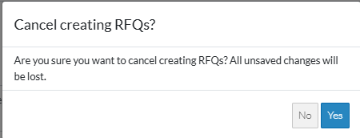
If No is clicked, the Send RFQ form displays. See the steps above for maintaining the RFQs.
If Yes is clicked, the creation of the RFQs is cancelled and the Change Request Schedule of Values component is displayed. See Change Request - Schedule of Values - Overview.
Next Steps
For more information on the list of RFQs specific to the Change Request, see Change Request Specific RFQs - Overview.
To view/edit the RFQ, see Change Request Specific RFQs - View/Edit.
To view/edit the Response received from the Subcontractor/Vendor, see RFQ - View/Edit - Receive Response from Subcontractor/Vendor
To manually update the Response, see RFQ - View/Edit - Update Response.
