This is help for changing the status of an existing RFQ to the Draft Status (see RFQ – Status for more information).
An RFQ can only be changed to the Draft Status if a Response has not been entered. If a Response has been entered, the Draft Status is grayed out and not selectable
Initiate the edit of the RFQ. It can be invoked from the List of RFQs for a specific Change Request, see Change Request Specific RFQs - View/Edit OR List of RFQs for all Change Requests, see Change Requests - List of all RFQs - View/Edit The RFQ - View/Edit form displays. The layout and navigation of this form depends on what the current status of the RFQ is.Click here for more information on the Layout and Navigation of the form for each Status
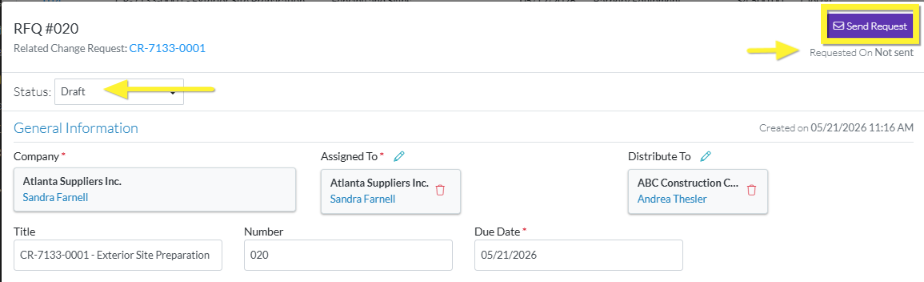
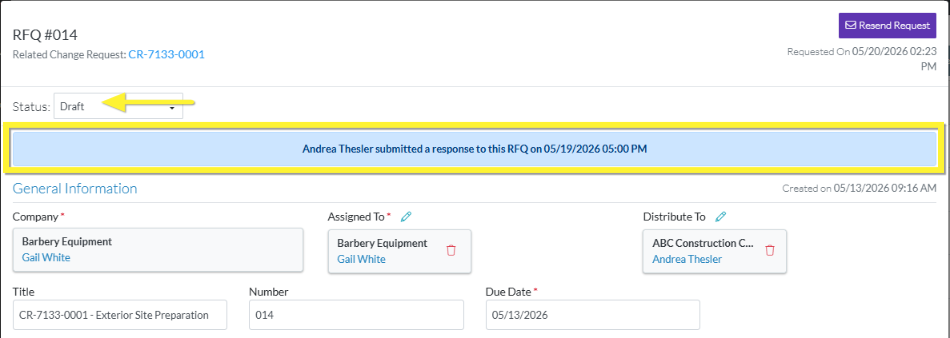
Select the Draft Status. Note* The following shows changing the Status from Pricing to Draft but the steps are the same for whatever Status the RFQ is currently in. As soon as the Status is changed, the form is saved with the Draft Status and the Layout and Navigation of the form changes to the Draft Layout. See RFQ - View/Edit - Layout and Navigation - Draft Status. If the RFQ was previously sent to the Company/Contact: - The button is a Resend Request button (as it was already sent once). - The date/time the request was sent is retained and displays as the Requested OnIf the RFQ was not previously sent to the Company/Contact: - The button is a Send Request button (as it has not yet been sent). - The Request On displays: Not SentIf a Response was previously submitted: If a Company/Contact had submitted a Response previously (whether they entered it themselves or it was entered by the Project Manager/Estimator on their behalf), - a message line is displayed indicating that and - the information is retained and will display once the Status is changed again to one that shows the Response. It displays: - The contact who submitted the response (which could be an external Vendor/Subcontractor if they entered it themselves or the Project Manager/Estimator if they entered it on their behalf).
 Updated
 button (as it was already sent once).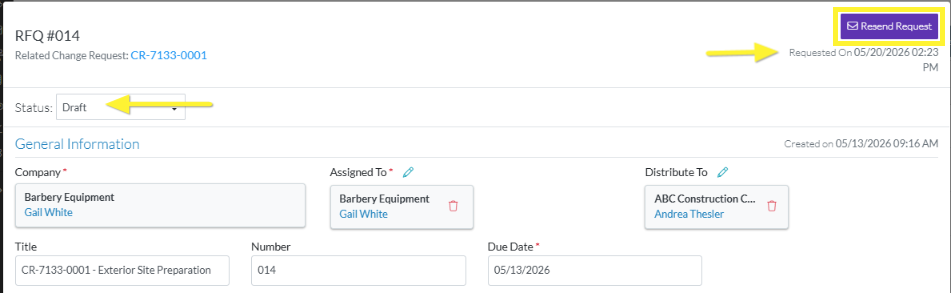
 button (as it has not yet been sent).