RFQ - View/Edit - Close
 Updated
Suggested Prior Reading
Change Request Specific RFQs - View/Edit
OR
Change Requests - List of all RFQs - View/Edit
RFQ - View/Edit - Closed Status
Approve RFQ and Update Change Request Quote
RFQs can be closed for different reasons; such as:
- An RFQ quote was received and Approved.
- The RFQ is not proceeding
Reports can be run for Closed (or not closed) RFQs as well the List of all RFQs can be filtered to include Closed (or Not) RFQs.
To close an RFQ:
- View or Edit the RFQ, see the following for the appropriate list the view/edit is being invoked from:
Change Request Specific RFQs - View/Edit
OR
Change Requests - List of all RFQs - View/Edit
The RFQ - View/Edit form displays. The layout and navigation of the form will depend on the Status of the RFQ.Click here for more information on the Layout and Navigation of the form for each Status
For RFQs in a Draft status, see RFQ - View/Edit - Layout and Navigation - Draft Status for more information.
For RFQs in a Pricing status, see RFQ - View/Edit - Layout and Navigation - Pricing Status for more information.
For RFQs in a Reviewing Status, see RFQ - View/Edit - Layout and Navigation - Reviewing Status for more information.
For RFQs in a Revise Status, see RFQ - View/Edit - Layout and Navigation - Revise Status for more information.
For RFQs in an Approved Status, see RFQ - View/Edit - Layout and Navigation - Approved Status for more information.
The following example is for an RFQ in a Approved Status but the steps will be the same for any Status.
- To change the Status to Closed, click on the Status drop down.
- Click on Closed.
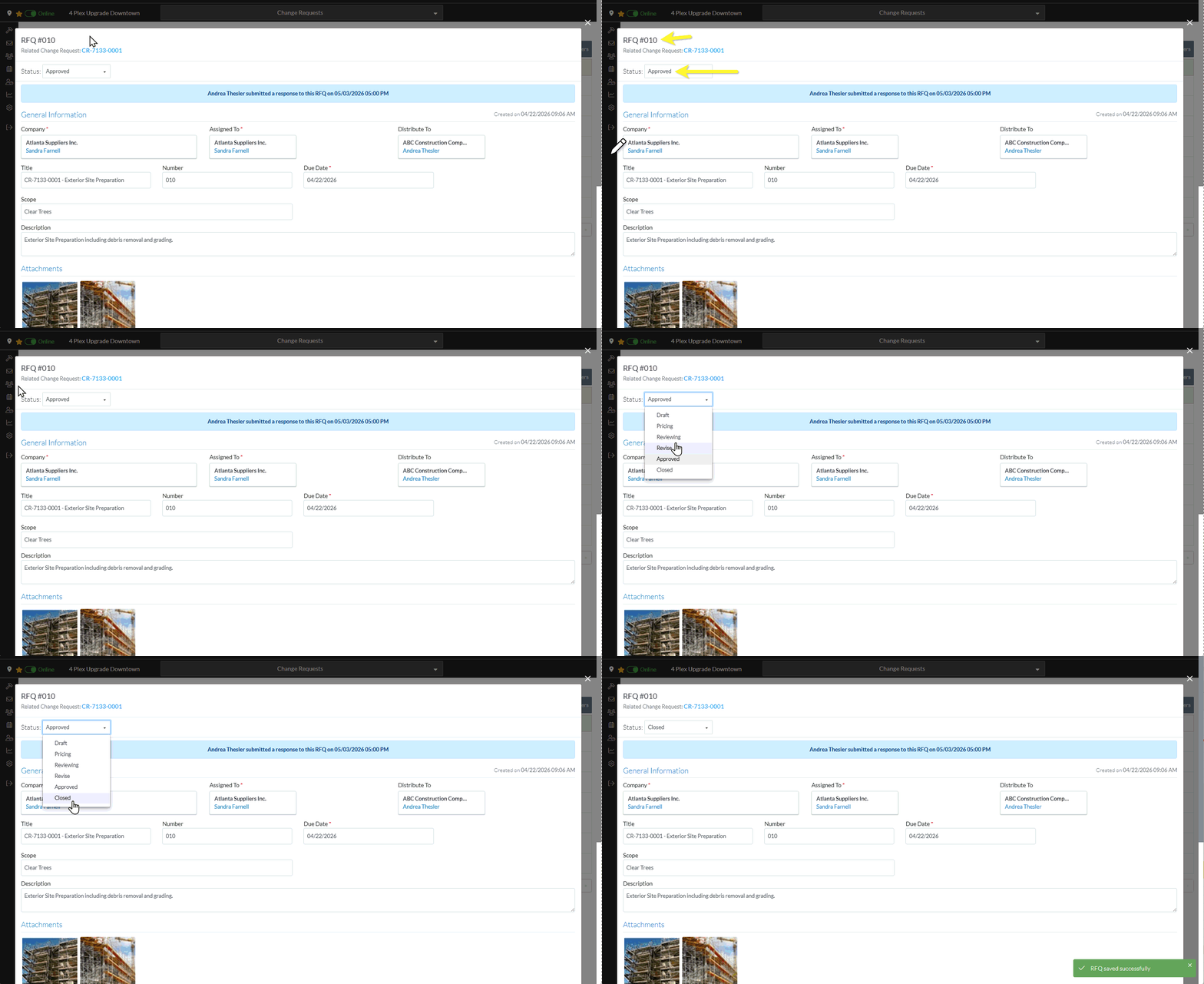
- Continue editing the RFQ, see More Information below.
OR
Click the Close button to close the RFQ form, see Next Steps below.
More Information
Manually set the Status of the RFQ to another Status
Set the Status to Draft, see RFQ - View/Edit - Edit Status to Draft
Set the Status to Reviewing, see RFQ - View/Edit - Edit Status to Reviewing
Set the Status to Revise, see RFQ - View/Edit - Edit Status to Revise
Set the Status to Approved, see RFQ - View/Edit - Edit Status to Approved
Set the Status to Closed, see RFQ - View/Edit - Edit Status to Closed
Delete the RFQ, see RFQ - Delete.
Next Steps
The list the View/Edit was invoked from displays.
- If it was invoked from the Change Request - View/Edit form via the RFQs component, see Change Request Specific RFQs - Overview.
- If it was invoked from the Change Requests on the Project Navigation Menu and via the RFQs in the Lists Navigation Menu, see Change Requests - List of all RFQs - Overview.
